Plug your brand's content and settings into AMP-triggered flows prebuilt by Wunderkind
View AMP-Triggered Flows
After connecting your Klaviyo account in Wunderkind Platform, navigate to your Flows page and filter by the wknd tag.
You'll find 12 pre‑configured AMP-triggered flows, each triggered by a corresponding Wunderkind metric. Feel free to delete any flows and metrics which fall outside of your planned strategy.
| Flow Name | Channel | Strategy |
| Wunderkind - Cart Abandonment | Abandonment | |
| Wunderkind - Product Abandonment | ||
| Wunderkind - Category Abandonment | ||
| Wunderkind - Back in Stock | Catalog | |
| Wunderkind - Price Drop | ||
| Wunderkind - Low Stock | ||
| Wunderkind Text - Cart Abandonment | Text | Abandonment |
| Wunderkind Text - Product Abandonment | ||
| Wunderkind Text - Category Abandonment | ||
| Wunderkind Text - Back in Stock | Catalog | |
| Wunderkind Text - Price Drop | ||
| Wunderkind Text - Low Stock |
📝 Wunderkind provisions all AMP-triggered flows and individual message steps with standardized naming conventions expected by our automated reporting. If you must rename these assets, please stay within the rules outlined here, so that data will not be missing or mis-categorized in your Wunderkind reports.
Complete Email Flows
Email Message Cadence
| Prospect Path | Customer Path |
| Abandonment | |
Email 1 (30 min delay) |
Email 1 (30 min delay) |
Email 2 (+1 day) |
Email 2 (+1 day) |
Email 3 (+1 day) |
Email 3 (+1 day) |
Email 4 (+1 day) |
|
| Catalog | |
Email 1 |
Email 1 |
Email 2 (+1 day) |
Email 2 (+1 day) |
Email Content
Click on each Email block to view settings for that specific message. In the right-hand panel, ensure subject line, preview text, sender name, sender email address, reply-to address are set as desired.
Click Select template to choose a creative from your Templates library. In this step, choose a template that leverages one of the product grids that Wunderkind has added to your Universal Content library. A common approach is to build a single base layout in your Templates library, then reuse it across flow messages, updating copy and links as needed.
Complete Text Flows
Text Message Cadence - Abandonment
Prospect Path |
Customer Path |
| Category & Product Abandonment | |
Text 1 (no delay) |
Text 1 (no delay) |
Text 2 (+3 day) |
Text 2 (+3 day) |
| Cart Abandonment | |
Text 1 (no delay) |
Text 1 (no delay) |
Text Message Cadence - Catalog
All Users |
Text 1 (no delay) |
Text 2 (+1 day) |
Text Content
Click on each Text message block to view configuration options. In the right-hand panel, in the Content section, click Edit.
On the text message editor page, add your Message content. Each flow is configured one-to-one directly to a wknd-text-example metric. To personalize content within your message, leverage the dynamic data fields outlined in our event properties documentation.
Cart Abandonment Example:
Message Content: Don't miss out on your {{ event.WkCopy }}. Secure your cart now: {{ event.WkUrl }}
Message Preview:
Don't miss out on your Blue Hover Chair. Secure your cart now: https://kvo2.io/XXXXXX
Confirm UTM Tracking
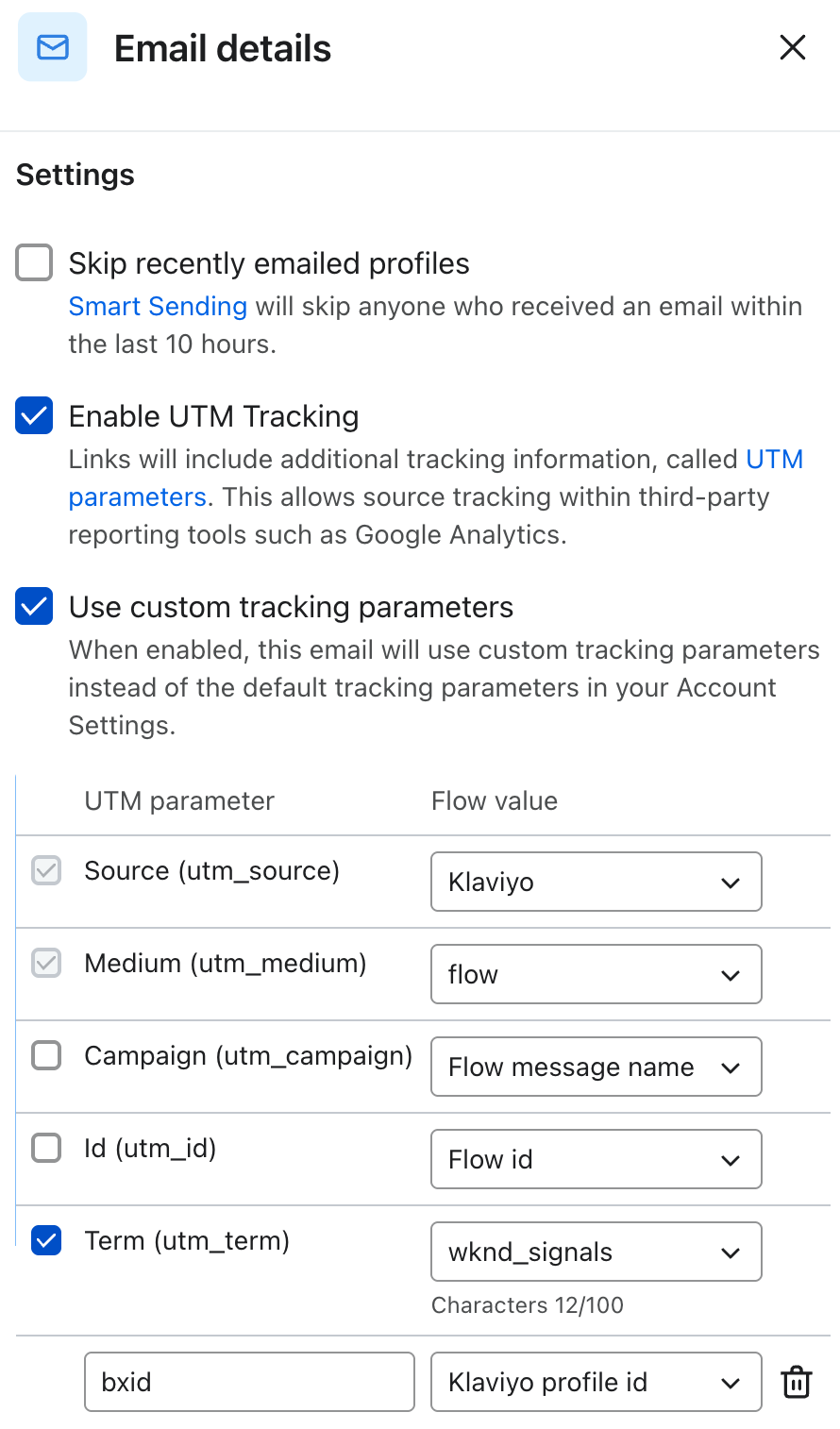
For both email and text flows, review UTM parameters on each message block. For identity continuity, Use custom tracking parameters should always be enabled, with utm_term set to wknd_signals (this UTM value is preserved for historical reporting continuity) and bxid populated with the Klaviyo profile id.
💡 To maximize identification and campaign reach, set bxid to Klaviyo profile ID on any non-Integration marketing emails as well.
Confirm Profile Filters
Both email and text flows start with a Metric Trigger, followed by multiple message blocks separated by delays. On each trigger, review the default Profile filters that control your flow eligibility and overlap, adjusting as desired. Klaviyo will check against these filters when someone first enters a flow and before each action (ex., email send, text send, etc).
Global Eligibility
-
To prevent users from continuing to receive the flow after they make a purchase, add a Profile filter for users who placed an order zero times since starting the flow. For example, if on Shopify, you can use the Placed Order event.
- To ensure that users can re-enter a completed Integration flow after taking the qualifying trigger action, each flow is configured to allow re-entry after its total duration (3 days or 1 day, depending on the channel and campaign type). Feel free to adjust this buffer as desired.
- For Klaviyo customers who began onboarding the Klaviyo AMP Integration before April 14, 2026, Wunderkind will only trigger an email flow to a user who is not unsubscribed in Klaviyo.
- For Klaviyo customers who began onboarding the Klaviyo AMP Integration after April 14, 2026, Wunderkind will trigger email flows to all users, relying on Klaviyo's Global suppressions feature to suppress unsubscribes.
- All AMP-triggered SMS are preconfigured with the Profile filter Person can receive sms marketing.
- 🔒 Add stricter consent filters if needed.
Preventing Overlap
Certain AMP-triggered flows are preconfigured to limit sends to profiles that have not received higher-priority messages within the past day, ensuring that:
- If a user is in sequence for a flow, then goes back to site and takes a higher-intent action, they'll always receive the higher-priority flow. The filter will skip remaining messages in the current flow.
- If a user is in sequence for a flow, then goes back to site and takes a lower-intent action, the filter will prevent their entry into the lower-priority flow.
- In either case, after one day has passed without a message from the higher-priority flow, the user will again become eligible to enter lower-priority flows if they meet the criteria.
These cross-flow suppressions should exist on Product and Category Abandonment flows only. Cart Abandonment, Back in Stock, Price Drop, and Low Stock flows should not be suppressed. The "Person has" dropdown will be configured to either Received Email or Received SMS, respective to the Integration channel.
-
Product Abandonment: Person has received a Cart Abandonment flow zero times in the last 1 day
-
Category Abandonment: Person has received a Cart Abandonment flow zero times in the last 1 day AND person has received a Product Abandonment flow zero times in the last 1 day
Text
-
Product Abandonment: Person has received a Cart Abandonment flow zero times in the last 3 days
-
Category Abandonment: Person has received a Cart Abandonment flow zero times in the last 3 days AND person has received a Product Abandonment flow zero times in the last 3 days
To learn more about Klaviyo Flows, visit the Klaviyo Help Center.
📖 Continue through the Getting Started Guide:
Comments
0 comments
Please sign in to leave a comment.